# Manual - Nota a partir de cupom

<table border="1" cellpadding="0" cellspacing="0" class="MsoNormalTable" id="bkmrk-m%C3%B3dulo-op-rotina-not" style="width: 468.0pt; border-collapse: collapse; border: none; mso-border-alt: solid windowtext .5pt; mso-padding-alt: 0cm .5pt 0cm .5pt; mso-border-insideh: .5pt solid windowtext; mso-border-insidev: .5pt solid windowtext;" width="0"><tbody><tr style="mso-yfti-irow: 0; mso-yfti-firstrow: yes;"><td style="width: 117.0pt; border: solid #BFBFBF 1.0pt; mso-border-alt: solid #BFBFBF .5pt; background: #D9E2F3; padding: 5.0pt 7.0pt 5.0pt 7.0pt;" valign="top" width="156">**Módulo**

</td><td style="width: 351.0pt; border: solid #BFBFBF 1.0pt; border-left: none; mso-border-left-alt: solid #BFBFBF .5pt; mso-border-alt: solid #BFBFBF .5pt; padding: 5.0pt 7.0pt 5.0pt 7.0pt;" valign="top" width="468">OP

</td></tr><tr style="mso-yfti-irow: 1;"><td style="width: 117.0pt; border: solid #BFBFBF 1.0pt; border-top: none; mso-border-top-alt: solid #BFBFBF .5pt; mso-border-alt: solid #BFBFBF .5pt; background: #D9E2F3; padding: 5.0pt 7.0pt 5.0pt 7.0pt;" valign="top" width="156">**Rotina**

</td><td style="width: 351.0pt; border-top: none; border-left: none; border-bottom: solid #BFBFBF 1.0pt; border-right: solid #BFBFBF 1.0pt; mso-border-top-alt: solid #BFBFBF .5pt; mso-border-left-alt: solid #BFBFBF .5pt; mso-border-alt: solid #BFBFBF .5pt; padding: 5.0pt 7.0pt 5.0pt 7.0pt;" valign="top" width="468">NOTA A PARTIR DE CUPOM

</td></tr><tr style="mso-yfti-irow: 2;"><td style="width: 117.0pt; border: solid #BFBFBF 1.0pt; border-top: none; mso-border-top-alt: solid #BFBFBF .5pt; mso-border-alt: solid #BFBFBF .5pt; background: #D9E2F3; padding: 5.0pt 7.0pt 5.0pt 7.0pt;" valign="top" width="156">**Autor**

</td><td style="width: 351.0pt; border-top: none; border-left: none; border-bottom: solid #BFBFBF 1.0pt; border-right: solid #BFBFBF 1.0pt; mso-border-top-alt: solid #BFBFBF .5pt; mso-border-left-alt: solid #BFBFBF .5pt; mso-border-alt: solid #BFBFBF .5pt; padding: 5.0pt 7.0pt 5.0pt 7.0pt;" valign="top" width="468">SHARA CAMPOS

</td></tr><tr style="mso-yfti-irow: 3; mso-yfti-lastrow: yes;"><td style="width: 117.0pt; border: solid #BFBFBF 1.0pt; border-top: none; mso-border-top-alt: solid #BFBFBF .5pt; mso-border-alt: solid #BFBFBF .5pt; background: #D9E2F3; padding: 5.0pt 7.0pt 5.0pt 7.0pt;" valign="top" width="156">**Data / Versão**

</td><td style="width: 351.0pt; border-top: none; border-left: none; border-bottom: solid #BFBFBF 1.0pt; border-right: solid #BFBFBF 1.0pt; mso-border-top-alt: solid #BFBFBF .5pt; mso-border-left-alt: solid #BFBFBF .5pt; mso-border-alt: solid #BFBFBF .5pt; padding: 5.0pt 7.0pt 5.0pt 7.0pt;" valign="top" width="468">17/07/2026

</td></tr></tbody></table>

<table border="1" cellpadding="0" cellspacing="0" class="MsoNormalTable" id="bkmrk-caminho" style="width: 468.0pt; border-collapse: collapse; border: none; mso-border-alt: solid windowtext .5pt; mso-padding-alt: 0cm .5pt 0cm .5pt; mso-border-insideh: .5pt solid windowtext; mso-border-insidev: .5pt solid windowtext;" width="0"><tbody><tr style="mso-yfti-irow: 0; mso-yfti-firstrow: yes; mso-yfti-lastrow: yes;"><td style="width: 468.0pt; border: none white 1.0pt; border-bottom: solid #1F4E79 1.0pt; mso-border-alt: none white 0cm; mso-border-bottom-alt: solid #1F4E79 1.0pt; background: #D9E2F3; padding: 6.0pt 8.0pt 6.0pt 8.0pt;" valign="top" width="624">**<span style="font-size: 13.0pt; color: #1f4e79;">Caminho</span>**

</td></tr></tbody></table>

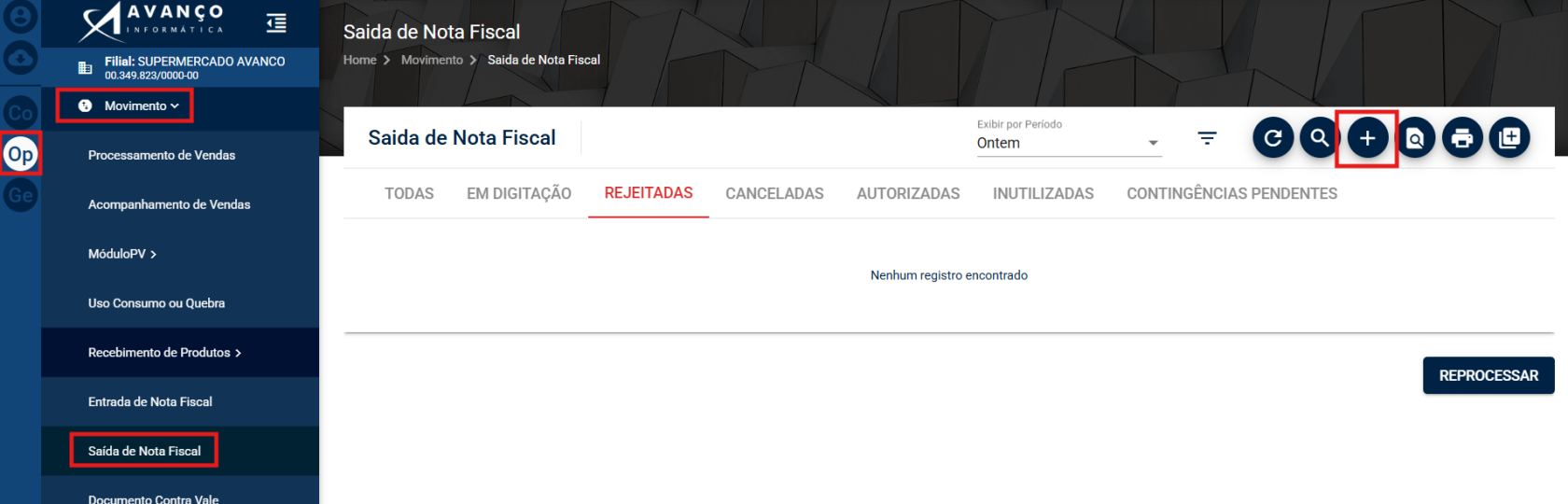
(OP) → Movimento → Saída → (+)

[![image.png](https://bc.avancoinfo.com.br/uploads/images/gallery/2026-07/scaled-1680-/mpsimage.png)](https://bc.avancoinfo.com.br/uploads/images/gallery/2026-07/mpsimage.png)
<table border="1" cellpadding="0" cellspacing="0" class="MsoNormalTable" id="bkmrk-o-que-%C3%89" style="width: 468.0pt; border-collapse: collapse; border: none; mso-border-alt: solid windowtext .5pt; mso-padding-alt: 0cm .5pt 0cm .5pt; mso-border-insideh: .5pt solid windowtext; mso-border-insidev: .5pt solid windowtext;" width="0"><tbody><tr style="mso-yfti-irow: 0; mso-yfti-firstrow: yes; mso-yfti-lastrow: yes;"><td style="width: 468.0pt; border: none white 1.0pt; border-bottom: solid #1F4E79 1.0pt; mso-border-alt: none white 0cm; mso-border-bottom-alt: solid #1F4E79 1.0pt; background: #D9E2F3; padding: 6.0pt 8.0pt 6.0pt 8.0pt;" valign="top" width="624">**<span style="font-size: 13.0pt; color: #1f4e79;">O Que É</span>**

</td></tr></tbody></table>

A rotina **Nota a partir de Cupom** permite emitir uma **Nota Fiscal Eletrônica (NF-e)** utilizando um ou mais cupons fiscais (NFC-e) como referência. Essa funcionalidade é utilizada para consolidar os cupons em uma nota fiscal correspondente, que será emitida com o **CFOP 5929**.

<table border="1" cellpadding="0" cellspacing="0" class="MsoNormalTable" id="bkmrk-como-acessar" style="width: 468.0pt; border-collapse: collapse; border: none; mso-border-alt: solid windowtext .5pt; mso-padding-alt: 0cm .5pt 0cm .5pt; mso-border-insideh: .5pt solid windowtext; mso-border-insidev: .5pt solid windowtext;" width="0"><tbody><tr style="mso-yfti-irow: 0; mso-yfti-firstrow: yes; mso-yfti-lastrow: yes;"><td style="width: 468.0pt; border: none white 1.0pt; border-bottom: solid #1F4E79 1.0pt; mso-border-alt: none white 0cm; mso-border-bottom-alt: solid #1F4E79 1.0pt; background: #D9E2F3; padding: 6.0pt 8.0pt 6.0pt 8.0pt;" valign="top" width="624">**<span style="font-size: 13.0pt; color: #1f4e79;">Como Acessar</span>**

</td></tr></tbody></table>

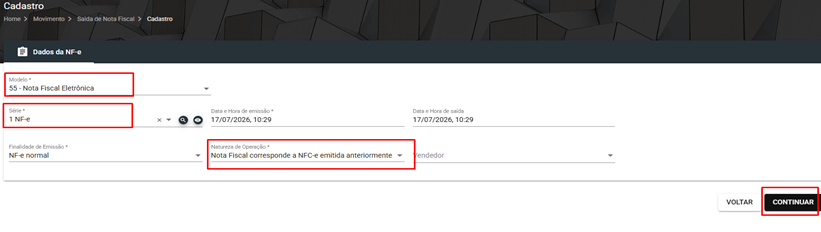
Acesse o menu **Operacional (OP) → Movimento → Saída** e clique no botão **(+)** para iniciar uma nova emissão. Na tela de inclusão da nota, informe os dados necessários, como modelo, série e natureza de operação, para prosseguir com a emissão da NF-e.

<table border="1" cellpadding="0" cellspacing="0" class="MsoNormalTable" id="bkmrk-como-criar-um-novo-r" style="width: 468.0pt; border-collapse: collapse; border: none; mso-border-alt: solid windowtext .5pt; mso-padding-alt: 0cm .5pt 0cm .5pt; mso-border-insideh: .5pt solid windowtext; mso-border-insidev: .5pt solid windowtext;" width="0"><tbody><tr style="mso-yfti-irow: 0; mso-yfti-firstrow: yes; mso-yfti-lastrow: yes;"><td style="width: 468.0pt; border: none white 1.0pt; border-bottom: solid #1F4E79 1.0pt; mso-border-alt: none white 0cm; mso-border-bottom-alt: solid #1F4E79 1.0pt; background: #D9E2F3; padding: 6.0pt 8.0pt 6.0pt 8.0pt;" valign="top" width="624">**<span style="font-size: 13.0pt; color: #1f4e79;">Como Criar um Novo Registro</span>**

</td></tr></tbody></table>

<span style="font-size: 12.0pt; line-height: 150%; font-family: 'Times New Roman',serif; mso-fareast-font-family: 'Times New Roman'; mso-hansi-font-family: Symbol;"><span style="mso-list: Ignore;">1.<span style="font: 7.0pt 'Times New Roman';"> </span></span></span><span style="font-size: 12.0pt; line-height: 150%; font-family: 'Times New Roman',serif; mso-fareast-font-family: 'Times New Roman';">Acesse **OP → Movimento → Saída** e clique no botão **(+)**. </span>

<span style="font-size: 12.0pt; line-height: 150%; font-family: 'Times New Roman',serif; mso-fareast-font-family: 'Times New Roman'; mso-hansi-font-family: Symbol;"><span style="mso-list: Ignore;">2.<span style="font: 7.0pt 'Times New Roman';"> </span></span></span><span style="font-size: 12.0pt; line-height: 150%; font-family: 'Times New Roman',serif; mso-fareast-font-family: 'Times New Roman';">No campo **Modelo**, selecione **55**. </span>

<span style="font-size: 12.0pt; line-height: 150%; font-family: 'Times New Roman',serif; mso-fareast-font-family: 'Times New Roman'; mso-hansi-font-family: Symbol;"><span style="mso-list: Ignore;">3.<span style="font: 7.0pt 'Times New Roman';"> </span></span></span><span style="font-size: 12.0pt; line-height: 150%; font-family: 'Times New Roman',serif; mso-fareast-font-family: 'Times New Roman';">Informe a **Série** da nota fiscal. </span>

<span style="font-size: 12.0pt; line-height: 150%; font-family: 'Times New Roman',serif; mso-fareast-font-family: 'Times New Roman'; mso-hansi-font-family: Symbol;"><span style="mso-list: Ignore;">4.<span style="font: 7.0pt 'Times New Roman';"> </span></span></span><span style="font-size: 12.0pt; line-height: 150%; font-family: 'Times New Roman',serif; mso-fareast-font-family: 'Times New Roman';">No campo **Natureza de Operação**, selecione **NOTA FISCAL CORRESPONDENTE A NFC-E EMITIDA ANTERIORMENTE**. </span>

<span style="font-size: 12.0pt; line-height: 150%; font-family: 'Times New Roman',serif; mso-fareast-font-family: 'Times New Roman'; mso-hansi-font-family: Symbol;"><span style="mso-list: Ignore;">5.<span style="font: 7.0pt 'Times New Roman';"> </span></span></span><span style="font-size: 12.0pt; line-height: 150%; font-family: 'Times New Roman',serif; mso-fareast-font-family: 'Times New Roman';">Clique em **Continuar**.</span>

[![image.png](https://bc.avancoinfo.com.br/uploads/images/gallery/2026-07/scaled-1680-/yW1YWmimage.png)](https://bc.avancoinfo.com.br/uploads/images/gallery/2026-07/yW1YWmimage.png)<span style="mso-no-proof: yes;"></span>

<span style="font-size: 12.0pt; line-height: 150%; font-family: 'Times New Roman',serif; mso-fareast-font-family: 'Times New Roman'; mso-hansi-font-family: Symbol;"><span style="mso-list: Ignore;">6.<span style="font: 7.0pt 'Times New Roman';"> </span></span></span><span style="font-size: 12.0pt; line-height: 150%; font-family: 'Times New Roman',serif; mso-fareast-font-family: 'Times New Roman';">Escolha a forma de localizar os cupons que serão referenciados:</span>

**<span style="font-size: 12.0pt; font-family: 'Times New Roman',serif; mso-fareast-font-family: 'Times New Roman';"> Documento Individual</span>**<span style="font-size: 12.0pt; font-family: 'Times New Roman',serif; mso-fareast-font-family: 'Times New Roman';">, para localizar um cupom específico. </span>

**<span style="font-size: 12.0pt; font-family: 'Times New Roman',serif; mso-fareast-font-family: 'Times New Roman';">Cliente</span>**<span style="font-size: 12.0pt; font-family: 'Times New Roman',serif; mso-fareast-font-family: 'Times New Roman';">, para listar os cupons emitidos para um determinado cliente.</span><span style="font-size: 12.0pt; font-family: 'Times New Roman',serif; mso-fareast-font-family: 'Times New Roman';"> </span>

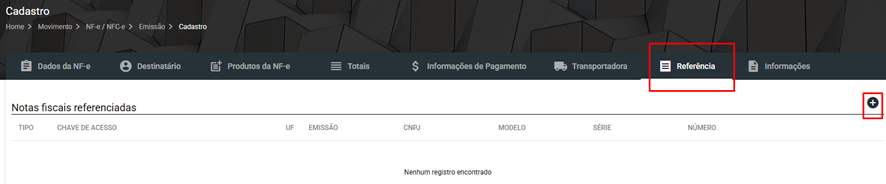
<span style="font-size: 12.0pt; line-height: 150%; font-family: 'Times New Roman',serif; mso-fareast-font-family: 'Times New Roman'; mso-hansi-font-family: Symbol;"><span style="mso-list: Ignore;">7.<span style="font: 7.0pt 'Times New Roman';"> </span></span></span><span style="font-size: 12.0pt; line-height: 150%; font-family: 'Times New Roman',serif; mso-fareast-font-family: 'Times New Roman';">Caso seja necessário referenciar mais de um cupom, acesse a aba **Referência**, clique no botão **(+)** e adicione os demais cupons fiscais. </span>

[![image.png](https://bc.avancoinfo.com.br/uploads/images/gallery/2026-07/scaled-1680-/Zglimage.png)](https://bc.avancoinfo.com.br/uploads/images/gallery/2026-07/Zglimage.png)

<span style="font-size: 12.0pt; mso-bidi-font-size: 11.0pt; line-height: 150%; font-family: 'Times New Roman',serif; mso-fareast-font-family: 'Times New Roman';"><span style="mso-list: Ignore;">8.<span style="font: 7.0pt 'Times New Roman';"> </span></span></span><span style="font-size: 12.0pt; line-height: 150%; font-family: 'Times New Roman',serif; mso-fareast-font-family: 'Times New Roman';">Após incluir todas as referências necessárias, continue o preenchimento da nota e conclua a emissão.</span>

<table border="1" cellpadding="0" cellspacing="0" class="MsoNormalTable" id="bkmrk-como-editar-ou-exclu" style="width: 468.0pt; border-collapse: collapse; border: none; mso-border-alt: solid windowtext .5pt; mso-padding-alt: 0cm .5pt 0cm .5pt; mso-border-insideh: .5pt solid windowtext; mso-border-insidev: .5pt solid windowtext;" width="0"><tbody><tr style="mso-yfti-irow: 0; mso-yfti-firstrow: yes; mso-yfti-lastrow: yes;"><td style="width: 468.0pt; border: none white 1.0pt; border-bottom: solid #1F4E79 1.0pt; mso-border-alt: none white 0cm; mso-border-bottom-alt: solid #1F4E79 1.0pt; background: #D9E2F3; padding: 6.0pt 8.0pt 6.0pt 8.0pt;" valign="top" width="624">**<span style="font-size: 13.0pt; color: #1f4e79;">Como Editar ou Excluir</span>**

</td></tr></tbody></table>

Caso a nota ainda permita digitação, localize-a na rotina **OP → Movimento → Saída**, selecione o registro desejado e utilize as opções disponíveis para edição ou exclusão.

<table border="1" cellpadding="0" cellspacing="0" class="MsoNormalTable" id="bkmrk-observa%C3%A7%C3%B5es-importan" style="width: 468.0pt; border-collapse: collapse; border: none; mso-border-alt: solid windowtext .5pt; mso-padding-alt: 0cm .5pt 0cm .5pt; mso-border-insideh: .5pt solid windowtext; mso-border-insidev: .5pt solid windowtext;" width="0"><tbody><tr style="mso-yfti-irow: 0; mso-yfti-firstrow: yes; mso-yfti-lastrow: yes;"><td style="width: 468.0pt; border: none white 1.0pt; border-bottom: solid #1F4E79 1.0pt; mso-border-alt: none white 0cm; mso-border-bottom-alt: solid #1F4E79 1.0pt; background: #D9E2F3; padding: 6.0pt 8.0pt 6.0pt 8.0pt;" valign="top" width="624">**<span style="font-size: 13.0pt; color: #1f4e79;">Observações Importantes (opcional)</span>**

</td></tr></tbody></table>

<span style="mso-list: Ignore;">1.<span style="font: 7.0pt 'Times New Roman';"> </span></span>A nota emitida por esta rotina será gerada com **CFOP 5929**.

<span style="mso-list: Ignore;">2.<span style="font: 7.0pt 'Times New Roman';"> </span></span>É possível referenciar **um ou vários cupons fiscais** na mesma nota.

<span style="mso-list: Ignore;">3.<span style="font: 7.0pt 'Times New Roman';"> </span></span>Os cupons podem ser localizados por **Documento Individual** ou por **Cliente**, conforme a necessidade da operação.

<span style="mso-list: Ignore;">4.<span style="font: 7.0pt 'Times New Roman';"> </span></span>Antes de concluir a emissão, verifique se todos os cupons desejados foram adicionados na aba **Referência**.

*<span style="font-size: 9.0pt; color: #595959;"> Manual de Rotinas - Novo Avanço</span>*