# Manual - Observações de Ajustes Fiscais

**<span style="font-size: 13.0pt; color: #1f4e79;">MANUAL DE ROTINAS - NOVO AVANÇO</span>**

<table border="1" cellpadding="0" cellspacing="0" class="MsoNormalTable" id="bkmrk-m%C3%B3dulo-co-rotina-obs" style="width: 468pt; border-collapse: collapse; height: 113.812px; border: medium none currentcolor;" width="0"><tbody><tr style="height: 28.4531px;"><td style="width: 130pt; border: 1pt solid rgb(191, 191, 191); background: rgb(217, 226, 243); padding: 4pt 7pt; height: 28.4531px;" width="173">**<span style="color: black;">Módulo</span>**

</td><td style="width: 338pt; border-width: 1pt 1pt 1pt medium; border-style: solid solid solid none; border-color: rgb(191, 191, 191) rgb(191, 191, 191) rgb(191, 191, 191) currentcolor; padding: 4pt 7pt; height: 28.4531px;" width="451"><span style="font-size: 11.0pt; line-height: 107%; font-family: 'Arial',sans-serif; mso-fareast-font-family: Arial; color: gray; mso-ansi-language: PT-BR; mso-fareast-language: PT-BR; mso-bidi-language: AR-SA;">CO</span>

</td></tr><tr style="height: 28.4531px;"><td style="width: 130pt; border-width: medium 1pt 1pt; border-style: none solid solid; border-color: currentcolor rgb(191, 191, 191) rgb(191, 191, 191); background: rgb(217, 226, 243); padding: 4pt 7pt; height: 28.4531px;" width="173">**<span style="color: black;">Rotina</span>**

</td><td style="width: 338pt; border-width: medium 1pt 1pt medium; border-style: none solid solid none; border-color: currentcolor rgb(191, 191, 191) rgb(191, 191, 191) currentcolor; padding: 4pt 7pt; height: 28.4531px;" width="451"><span style="font-size: 11.0pt; line-height: 107%; font-family: 'Arial',sans-serif; mso-fareast-font-family: Arial; color: gray; mso-ansi-language: PT-BR; mso-fareast-language: PT-BR; mso-bidi-language: AR-SA;">OBSERVAÇÕES DE AJUSTES FISCAIS</span>

</td></tr><tr style="height: 28.4531px;"><td style="width: 130pt; border-width: medium 1pt 1pt; border-style: none solid solid; border-color: currentcolor rgb(191, 191, 191) rgb(191, 191, 191); background: rgb(217, 226, 243); padding: 4pt 7pt; height: 28.4531px;" width="173">**<span style="color: black;">Autor</span>**

</td><td style="width: 338pt; border-width: medium 1pt 1pt medium; border-style: none solid solid none; border-color: currentcolor rgb(191, 191, 191) rgb(191, 191, 191) currentcolor; padding: 4pt 7pt; height: 28.4531px;" width="451"><span style="font-size: 11.0pt; line-height: 107%; font-family: 'Arial',sans-serif; mso-fareast-font-family: Arial; color: gray; mso-ansi-language: PT-BR; mso-fareast-language: PT-BR; mso-bidi-language: AR-SA;">Cristiano Abreu</span>

</td></tr><tr style="height: 28.4531px;"><td style="width: 130pt; border-width: medium 1pt 1pt; border-style: none solid solid; border-color: currentcolor rgb(191, 191, 191) rgb(191, 191, 191); background: rgb(217, 226, 243); padding: 4pt 7pt; height: 28.4531px;" width="173">**<span style="color: black;">Data</span>**

</td><td style="width: 338pt; border-width: medium 1pt 1pt medium; border-style: none solid solid none; border-color: currentcolor rgb(191, 191, 191) rgb(191, 191, 191) currentcolor; padding: 4pt 7pt; height: 28.4531px;" width="451"><span style="font-size: 11.0pt; line-height: 107%; font-family: 'Arial',sans-serif; mso-fareast-font-family: Arial; color: gray; mso-ansi-language: PT-BR; mso-fareast-language: PT-BR; mso-bidi-language: AR-SA;">16/06/2026 — v1.0</span>

</td></tr></tbody></table>

<span style="mso-tab-count: 1;"> </span>

<table border="1" cellpadding="0" cellspacing="0" class="MsoNormalTable" id="bkmrk-caminho" style="width: 468.0pt; border-collapse: collapse; border: none; mso-border-alt: none white 0cm; mso-border-bottom-alt: solid #1F4E79 1.0pt; mso-padding-alt: 0cm .5pt 0cm .5pt; mso-border-insideh: 0cm none white; mso-border-insidev: 0cm none white;" width="0"><tbody><tr style="mso-yfti-irow: 0; mso-yfti-firstrow: yes; mso-yfti-lastrow: yes;"><td style="width: 468.0pt; border: none white 1.0pt; border-bottom: solid #1F4E79 1.0pt; mso-border-alt: none white 0cm; mso-border-bottom-alt: solid #1F4E79 1.0pt; background: #D9E2F3; padding: 5.0pt 8.0pt 5.0pt 8.0pt;" valign="top" width="624">**<span style="font-size: 13.0pt; color: #1f4e79;">Caminho</span>**

</td></tr></tbody></table>

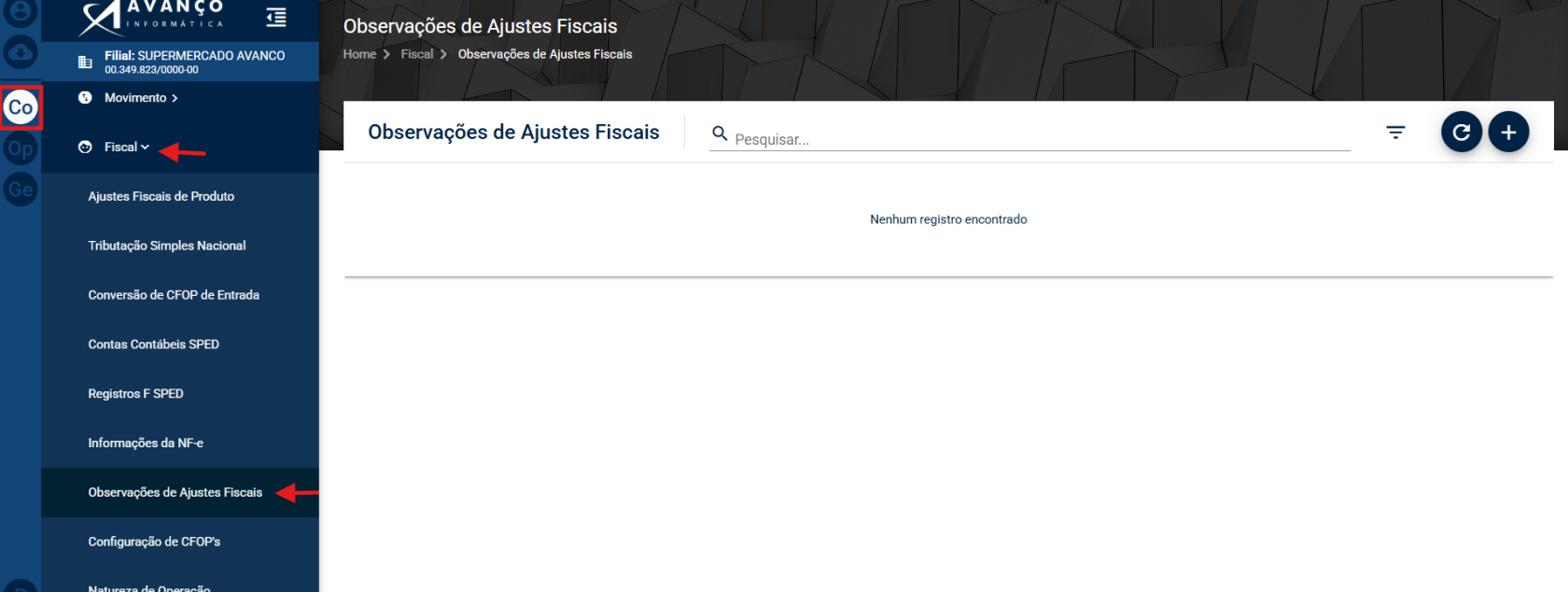
<span style="font-family: 'Arial',sans-serif; mso-fareast-font-family: Arial; color: gray;">Configurações Novo Avanço (CO) </span><span style="font-family: 'Cambria Math',serif; mso-fareast-font-family: 'Cambria Math'; mso-bidi-font-family: 'Cambria Math'; color: gray;">→</span><span style="font-family: 'Arial',sans-serif; mso-fareast-font-family: Arial; color: gray;"> Fiscal </span><span style="font-family: 'Cambria Math',serif; mso-fareast-font-family: 'Cambria Math'; mso-bidi-font-family: 'Cambria Math'; color: gray;">→</span><span style="font-family: 'Arial',sans-serif; mso-fareast-font-family: Arial; color: gray;"> Observações de Ajustes Fiscais</span>

[![image.png](https://bc.avancoinfo.com.br/uploads/images/gallery/2026-07/scaled-1680-/PHpimage.png)](https://bc.avancoinfo.com.br/uploads/images/gallery/2026-07/PHpimage.png)

<table border="1" cellpadding="0" cellspacing="0" class="MsoNormalTable" id="bkmrk-o-que-%C3%89" style="width: 468.0pt; border-collapse: collapse; border: none; mso-border-alt: none white 0cm; mso-border-bottom-alt: solid #1F4E79 1.0pt; mso-padding-alt: 0cm .5pt 0cm .5pt; mso-border-insideh: 0cm none white; mso-border-insidev: 0cm none white;" width="0"><tbody><tr style="mso-yfti-irow: 0; mso-yfti-firstrow: yes; mso-yfti-lastrow: yes;"><td style="width: 468.0pt; border: none white 1.0pt; border-bottom: solid #1F4E79 1.0pt; mso-border-alt: none white 0cm; mso-border-bottom-alt: solid #1F4E79 1.0pt; background: #D9E2F3; padding: 5.0pt 8.0pt 5.0pt 8.0pt;" valign="top" width="624">**<span style="font-size: 13.0pt; color: #1f4e79;">O Que É</span>**

</td></tr></tbody></table>

<span style="font-family: 'Arial',sans-serif; mso-fareast-font-family: Arial; color: gray;">Ao gerar algum ajuste fiscal para o SPED Fiscal, através da rotina Op </span><span style="font-family: 'Cambria Math',serif; mso-fareast-font-family: 'Cambria Math'; mso-bidi-font-family: 'Cambria Math'; color: gray;">→</span><span style="font-family: 'Arial',sans-serif; mso-fareast-font-family: Arial; color: gray;"> Fiscal </span><span style="font-family: 'Cambria Math',serif; mso-fareast-font-family: 'Cambria Math'; mso-bidi-font-family: 'Cambria Math'; color: gray;">→</span><span style="font-family: 'Arial',sans-serif; mso-fareast-font-family: Arial; color: gray;"> Ajustes Fiscais, é obrigatório informar uma "Observação Fiscal" que será levado para o Registro 0460 que é "Tabela de Observações do Lançamento Fiscal", do Bloco 0.</span>

<table border="1" cellpadding="0" cellspacing="0" class="MsoNormalTable" id="bkmrk-como-acessar" style="width: 468.0pt; border-collapse: collapse; border: none; mso-border-alt: none white 0cm; mso-border-bottom-alt: solid #1F4E79 1.0pt; mso-padding-alt: 0cm .5pt 0cm .5pt; mso-border-insideh: 0cm none white; mso-border-insidev: 0cm none white;" width="0"><tbody><tr style="mso-yfti-irow: 0; mso-yfti-firstrow: yes; mso-yfti-lastrow: yes;"><td style="width: 468.0pt; border: none white 1.0pt; border-bottom: solid #1F4E79 1.0pt; mso-border-alt: none white 0cm; mso-border-bottom-alt: solid #1F4E79 1.0pt; background: #D9E2F3; padding: 5.0pt 8.0pt 5.0pt 8.0pt;" valign="top" width="624">**<span style="font-size: 13.0pt; color: #1f4e79;">Como Acessar</span>**

</td></tr></tbody></table>

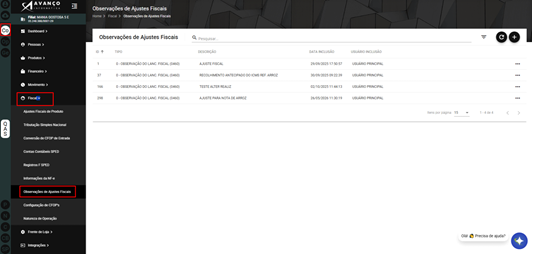
<span style="font-family: 'Arial',sans-serif; mso-fareast-font-family: Arial; color: gray;">Navegue pelo menu lateral: Co </span><span style="font-family: 'Cambria Math',serif; mso-fareast-font-family: 'Cambria Math'; mso-bidi-font-family: 'Cambria Math'; color: gray;">→</span><span style="font-family: 'Arial',sans-serif; mso-fareast-font-family: Arial; color: gray;"> Fiscal </span><span style="font-family: 'Cambria Math',serif; mso-fareast-font-family: 'Cambria Math'; mso-bidi-font-family: 'Cambria Math'; color: gray;">→ Observações de Ajustes Fiscais</span><span style="font-family: 'Arial',sans-serif; mso-fareast-font-family: Arial; color: gray;">. A tela exibirá a listagem de observações já existentes caso possua.</span>

[![image.png](https://bc.avancoinfo.com.br/uploads/images/gallery/2026-07/scaled-1680-/RHaimage.png)](https://bc.avancoinfo.com.br/uploads/images/gallery/2026-07/RHaimage.png)

<table border="1" cellpadding="0" cellspacing="0" class="MsoNormalTable" id="bkmrk-como-criar-um-novo-r" style="width: 468.0pt; border-collapse: collapse; border: none; mso-border-alt: none white 0cm; mso-border-bottom-alt: solid #1F4E79 1.0pt; mso-padding-alt: 0cm .5pt 0cm .5pt; mso-border-insideh: 0cm none white; mso-border-insidev: 0cm none white;" width="0"><tbody><tr style="mso-yfti-irow: 0; mso-yfti-firstrow: yes; mso-yfti-lastrow: yes;"><td style="width: 468.0pt; border: none white 1.0pt; border-bottom: solid #1F4E79 1.0pt; mso-border-alt: none white 0cm; mso-border-bottom-alt: solid #1F4E79 1.0pt; background: #D9E2F3; padding: 5.0pt 8.0pt 5.0pt 8.0pt;" valign="top" width="624">**<span style="font-size: 13.0pt; color: #1f4e79;">**<span style="font-size: 13.0pt; mso-bidi-font-size: 11.0pt; line-height: 107%; font-family: 'Arial',sans-serif; mso-fareast-font-family: Arial; color: #1f4e79; mso-ansi-language: PT-BR; mso-fareast-language: PT-BR; mso-bidi-language: AR-SA;">Como Criar um Novo Registro</span>**</span>**

</td></tr></tbody></table>

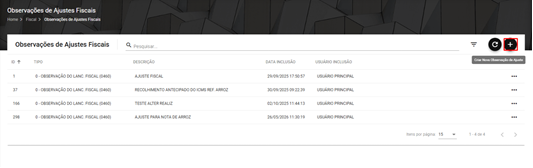
<span style="font-family: 'Arial',sans-serif; mso-fareast-font-family: Arial;"><span style="mso-list: Ignore;">•<span style="font: 7.0pt 'Times New Roman';"> </span></span></span><span style="font-family: 'Arial',sans-serif; mso-fareast-font-family: Arial; color: gray;">Primeiro passo — Clique no botão "+" no canto superior direito.</span>

[![image.png](https://bc.avancoinfo.com.br/uploads/images/gallery/2026-07/scaled-1680-/HnRimage.png)](https://bc.avancoinfo.com.br/uploads/images/gallery/2026-07/HnRimage.png)

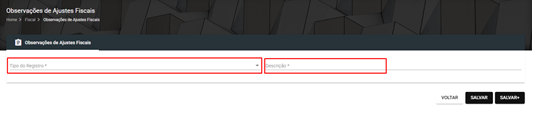
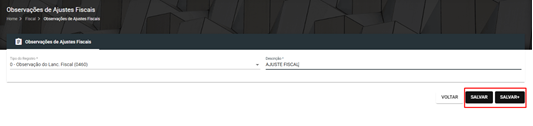
<span style="font-family: 'Arial',sans-serif; mso-fareast-font-family: Arial;"><span style="mso-list: Ignore;">•<span style="font: 7.0pt 'Times New Roman';"> </span></span></span><span style="font-family: 'Arial',sans-serif; mso-fareast-font-family: Arial; color: gray;">Segundo passo — Informe o tipo do registro e a descrição.</span>

[![image.png](https://bc.avancoinfo.com.br/uploads/images/gallery/2026-07/scaled-1680-/tQlimage.png)](https://bc.avancoinfo.com.br/uploads/images/gallery/2026-07/tQlimage.png)<span style="font-family: 'Arial',sans-serif; mso-fareast-font-family: Arial;"> </span>

<span style="font-family: 'Arial',sans-serif; mso-fareast-font-family: Arial;"><span style="mso-list: Ignore;">•<span style="font: 7.0pt 'Times New Roman';"> </span></span></span><span style="font-family: 'Arial',sans-serif; mso-fareast-font-family: Arial; color: gray;">Terceiro passo — Clique em SALVAR para voltar a tela com a listagem ou em SALVAR+, onde poderá criar outro ajuste que desejar.</span>

[![image.png](https://bc.avancoinfo.com.br/uploads/images/gallery/2026-07/scaled-1680-/0EYimage.png)](https://bc.avancoinfo.com.br/uploads/images/gallery/2026-07/0EYimage.png)

<span style="mso-no-proof: yes;"></span>

<table border="1" cellpadding="0" cellspacing="0" class="MsoNormalTable" id="bkmrk-como-editar-ou-exclu" style="width: 468.0pt; border-collapse: collapse; border: none; mso-border-alt: none white 0cm; mso-border-bottom-alt: solid #1F4E79 1.0pt; mso-padding-alt: 0cm .5pt 0cm .5pt; mso-border-insideh: 0cm none white; mso-border-insidev: 0cm none white;" width="0"><tbody><tr style="mso-yfti-irow: 0; mso-yfti-firstrow: yes; mso-yfti-lastrow: yes;"><td style="width: 468.0pt; border: none white 1.0pt; border-bottom: solid #1F4E79 1.0pt; mso-border-alt: none white 0cm; mso-border-bottom-alt: solid #1F4E79 1.0pt; background: #D9E2F3; padding: 5.0pt 8.0pt 5.0pt 8.0pt;" valign="top" width="624">**<span style="font-size: 13.0pt; color: #1f4e79;">Como Editar ou Excluir</span>**

</td></tr></tbody></table>

<span style="font-family: 'Arial',sans-serif; mso-fareast-font-family: Arial; color: gray;">Na listagem, clique nos três pontos (</span><span style="font-family: 'Cambria Math',serif; mso-fareast-font-family: 'Cambria Math'; mso-bidi-font-family: 'Cambria Math'; color: gray;">⋯</span><span style="font-family: 'Arial',sans-serif; mso-fareast-font-family: Arial; color: gray;">) ao lado do registro e selecione a ação desejada.</span>

<table border="1" cellpadding="0" cellspacing="0" class="MsoNormalTable" id="bkmrk-observa%C3%A7%C3%B5es-importan" style="width: 468.0pt; border-collapse: collapse; border: none; mso-border-alt: none white 0cm; mso-border-bottom-alt: solid #1F4E79 1.0pt; mso-padding-alt: 0cm .5pt 0cm .5pt; mso-border-insideh: 0cm none white; mso-border-insidev: 0cm none white;" width="0"><tbody><tr style="mso-yfti-irow: 0; mso-yfti-firstrow: yes; mso-yfti-lastrow: yes;"><td style="width: 468.0pt; border: none white 1.0pt; border-bottom: solid #1F4E79 1.0pt; mso-border-alt: none white 0cm; mso-border-bottom-alt: solid #1F4E79 1.0pt; background: #D9E2F3; padding: 5.0pt 8.0pt 5.0pt 8.0pt;" valign="top" width="624">**<span style="font-size: 13.0pt; color: #1f4e79;">Observações Importantes</span>**

</td></tr></tbody></table>

Não necessita de observações importantes.

*<span style="font-size: 10.0pt; color: gray;">Manual de Rotinas - Novo Avanço</span>*