# Manual - Saídas de Produtos de Uso e Consumo

<span style="font-family: 'Lexend Black'; mso-fareast-font-family: 'Lexend Black'; mso-bidi-font-family: 'Lexend Black';">Módulo</span><span style="mso-spacerun: yes;"> </span><span style="font-family: 'Lexend Light'; mso-fareast-font-family: 'Lexend Light'; mso-bidi-font-family: 'Lexend Light';"><span style="mso-spacerun: yes;"> </span>OP</span>

<span style="font-family: 'Lexend Black'; mso-fareast-font-family: 'Lexend Black'; mso-bidi-font-family: 'Lexend Black';">Rotina</span><span style="mso-spacerun: yes;"> </span><span style="font-family: 'Lexend Light'; mso-fareast-font-family: 'Lexend Light'; mso-bidi-font-family: 'Lexend Light';"><span style="mso-spacerun: yes;"> </span></span>**Saídas de Produtos de Uso e Consumo**<span style="font-family: 'Lexend Light'; mso-fareast-font-family: 'Lexend Light'; mso-bidi-font-family: 'Lexend Light';"> </span><span style="font-size: 12.0pt; line-height: 115%; font-family: 'Lexend Light'; mso-fareast-font-family: 'Lexend Light'; mso-bidi-font-family: 'Lexend Light';"><span style="mso-spacerun: yes;"> </span></span><span style="mso-spacerun: yes;"> </span>

<span style="font-family: 'Lexend Black'; mso-fareast-font-family: 'Lexend Black'; mso-bidi-font-family: 'Lexend Black';">Autor<span style="mso-spacerun: yes;"> </span></span><span style="font-size: 12.0pt; line-height: 115%; font-family: Lexend; mso-fareast-font-family: Lexend; mso-bidi-font-family: Lexend; color: #546e7a;">Eduardo Coutinho</span>

<span style="font-family: 'Lexend Black'; mso-fareast-font-family: 'Lexend Black'; mso-bidi-font-family: 'Lexend Black';">Data / Versão:</span> <span style="font-family: 'Lexend Light'; mso-fareast-font-family: 'Lexend Light'; mso-bidi-font-family: 'Lexend Light';">01/04/2026</span><span style="font-family: Lexend; mso-fareast-font-family: Lexend; mso-bidi-font-family: Lexend;"> </span>

<span style="font-size: 13.0pt; line-height: 115%; font-family: 'Lexend Black'; mso-fareast-font-family: 'Lexend Black'; mso-bidi-font-family: 'Lexend Black';">Caminho</span>

<span style="font-family: 'Lexend Black'; mso-fareast-font-family: 'Lexend Black'; mso-bidi-font-family: 'Lexend Black';"> </span>

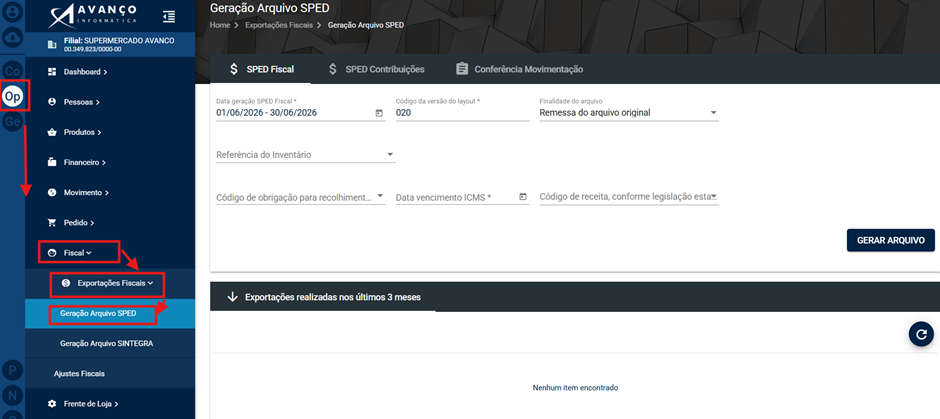
<span style="font-size: 12.0pt; line-height: 115%; font-family: 'Roboto Serif ExtraBold'; mso-fareast-font-family: 'Roboto Serif ExtraBold'; mso-bidi-font-family: 'Roboto Serif ExtraBold'; color: #188038;"> OP &gt; Fiscal &gt; Exportações Fiscais &gt; Geração de Arquivo SPED</span>**<span style="font-size: 12.0pt; line-height: 115%;"><span style="mso-spacerun: yes;"> </span></span>**<span style="font-size: 12.0pt; line-height: 115%;"><span style="mso-spacerun: yes;"> </span></span>

[![image.png](https://bc.avancoinfo.com.br/uploads/images/gallery/2026-07/scaled-1680-/uJ1image.png)](https://bc.avancoinfo.com.br/uploads/images/gallery/2026-07/uJ1image.png)

<span style="font-size: 13.0pt; line-height: 115%; font-family: 'Lexend Black'; mso-fareast-font-family: 'Lexend Black'; mso-bidi-font-family: 'Lexend Black';">O QUE É</span><span style="font-size: 12.0pt; line-height: 115%; font-family: 'Lexend Black'; mso-fareast-font-family: 'Lexend Black'; mso-bidi-font-family: 'Lexend Black';"> </span>

<span style="font-family: Lexend; mso-fareast-font-family: Lexend; mso-bidi-font-family: Lexend;">É um procedimento utilizado para registrar a saída de produtos que serão utilizados internamente pela empresa, sem finalidade de venda ou comercialização. Esses produtos podem ser materiais de consumo, itens de apoio, ferramentas, materiais de escritório, entre outros. </span>

<span style="font-size: 12.0pt; line-height: 115%; font-family: 'Lexend ExtraBold'; mso-fareast-font-family: 'Lexend ExtraBold'; mso-bidi-font-family: 'Lexend ExtraBold';"> </span>

<span style="font-size: 13.0pt; line-height: 115%; font-family: 'Lexend ExtraBold'; mso-fareast-font-family: 'Lexend ExtraBold'; mso-bidi-font-family: 'Lexend ExtraBold';">PASSO A PASSO:</span>

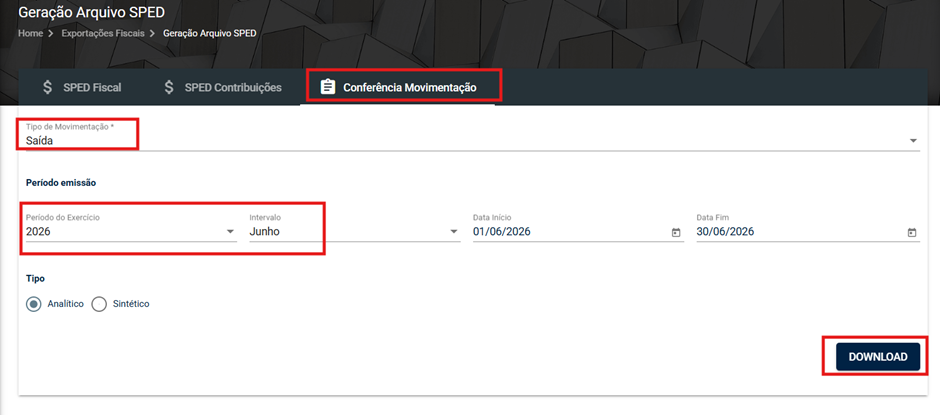
1. **Acessar Conferência de Movimentação:  
    <span style="mso-spacerun: yes;"> </span>**Vá até a aba **"Conferência Movimentação"**.

 **2.Seleção e Download:**

○<span style="font-size: 7.0pt; line-height: 115%; font-family: 'Times New Roman',serif; mso-fareast-font-family: 'Times New Roman';"><span style="mso-spacerun: yes;"> </span></span>Selecione **"Saída"**.

○<span style="font-size: 7.0pt; line-height: 115%; font-family: 'Times New Roman',serif; mso-fareast-font-family: 'Times New Roman';"><span style="mso-spacerun: yes;"> </span></span>Defina o **período** desejado.

○<span style="font-size: 7.0pt; line-height: 115%; font-family: 'Times New Roman',serif; mso-fareast-font-family: 'Times New Roman';"><span style="mso-spacerun: yes;"> </span></span>Clique em **Download**.

[![image.png](https://bc.avancoinfo.com.br/uploads/images/gallery/2026-07/scaled-1680-/RhDimage.png)](https://bc.avancoinfo.com.br/uploads/images/gallery/2026-07/RhDimage.png)

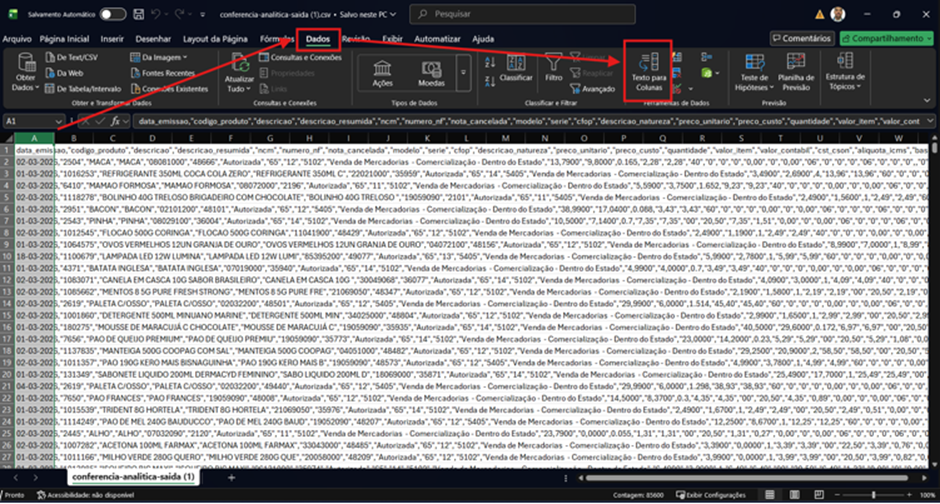
3. **Tratamento da Planilha (Texto para Colunas): <span style="mso-spacerun: yes;"> </span>**Ao abrir a planilha (.txt ou .csv), você precisará tratar os dados para separá-los em colunas.

<span style="font-size: 7.0pt; line-height: 115%; font-family: 'Times New Roman',serif; mso-fareast-font-family: 'Times New Roman';"><span style="mso-spacerun: yes;"> </span></span>Clique na **coluna A**.

<span style="mso-spacerun: yes;"> </span>Vá em **Dados** e depois em **Texto para Colunas.**

[![image.png](https://bc.avancoinfo.com.br/uploads/images/gallery/2026-07/scaled-1680-/4Ebimage.png)](https://bc.avancoinfo.com.br/uploads/images/gallery/2026-07/4Ebimage.png)
<span style="mso-no-proof: yes;">  
</span>

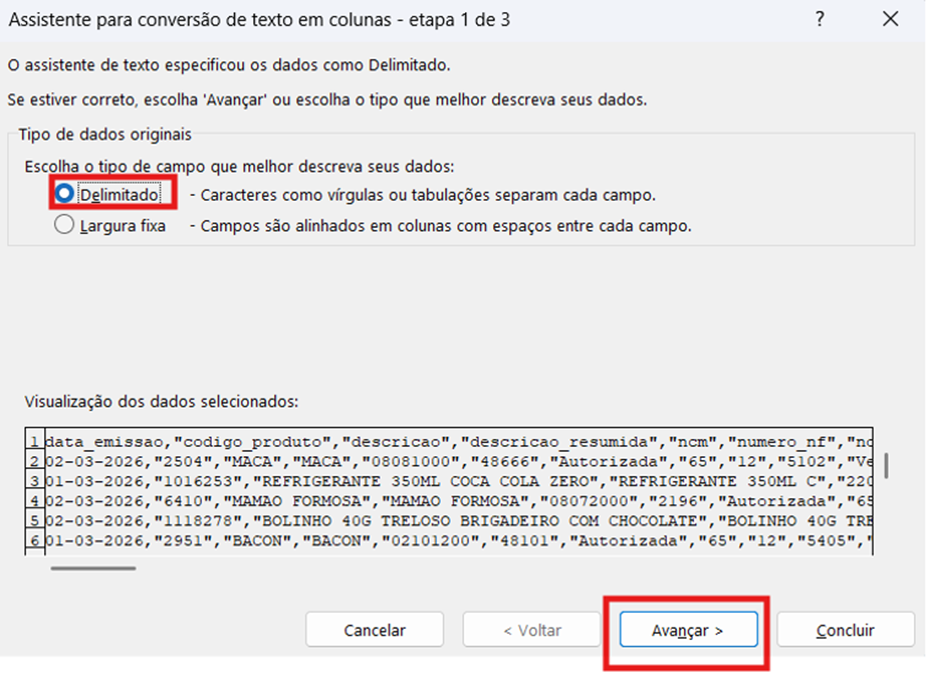
<span style="font-size: 12.0pt; line-height: 115%;">○</span><span style="font-size: 7.0pt; line-height: 115%; font-family: 'Times New Roman',serif; mso-fareast-font-family: 'Times New Roman';"><span style="mso-spacerun: yes;"> </span></span><span style="font-size: 12.0pt; line-height: 115%;">Selecione **"Delimitado"**.</span>

<span style="font-size: 12.0pt; line-height: 115%;">○</span><span style="font-size: 7.0pt; line-height: 115%; font-family: 'Times New Roman',serif; mso-fareast-font-family: 'Times New Roman';"><span style="mso-spacerun: yes;"> </span></span><span style="font-size: 12.0pt; line-height: 115%;">Clique em **Avançar**.</span>

<span style="font-size: 12.0pt; line-height: 115%;"> </span>

[![image.png](https://bc.avancoinfo.com.br/uploads/images/gallery/2026-07/scaled-1680-/UTximage.png)](https://bc.avancoinfo.com.br/uploads/images/gallery/2026-07/UTximage.png)

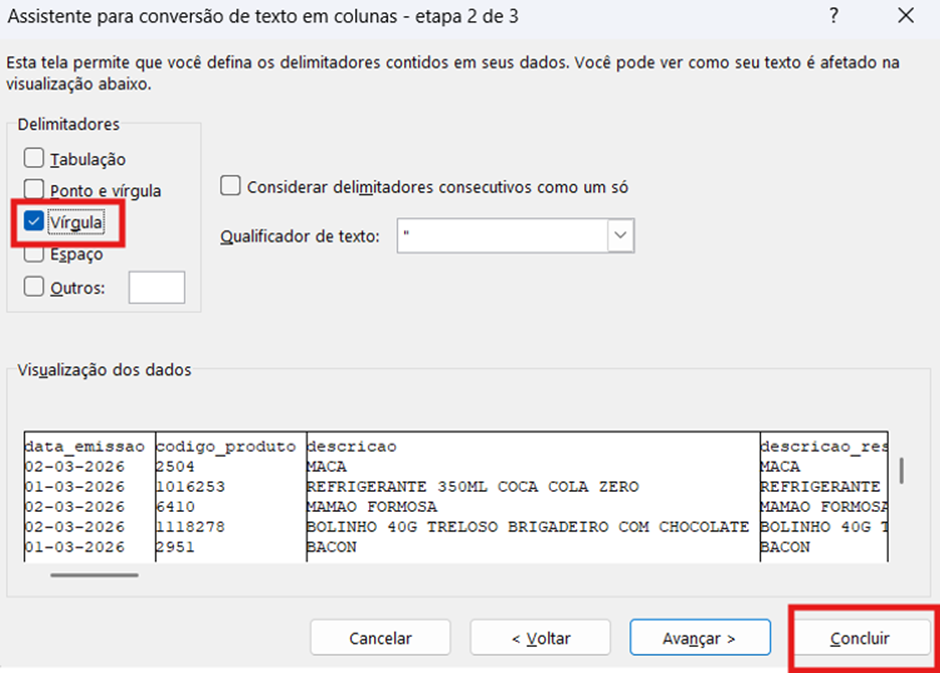
<span style="font-size: 12.0pt; line-height: 115%;">○</span><span style="font-size: 7.0pt; line-height: 115%; font-family: 'Times New Roman',serif; mso-fareast-font-family: 'Times New Roman';"><span style="mso-spacerun: yes;"> </span></span><span style="font-size: 12.0pt; line-height: 115%;">Desmarque todos os *checkboxes* e deixe **apenas "Vírgula"** marcado.</span>

<span style="font-size: 12.0pt; line-height: 115%;"><span style="mso-spacerun: yes;"> </span>Clique em </span>**Concluir**<span style="font-size: 12.0pt; line-height: 115%;"> .</span>

[![image.png](https://bc.avancoinfo.com.br/uploads/images/gallery/2026-07/scaled-1680-/5R1image.png)](https://bc.avancoinfo.com.br/uploads/images/gallery/2026-07/5R1image.png)

**<span style="font-size: 12.0pt; line-height: 115%;">4. Filtro Específico:</span>**

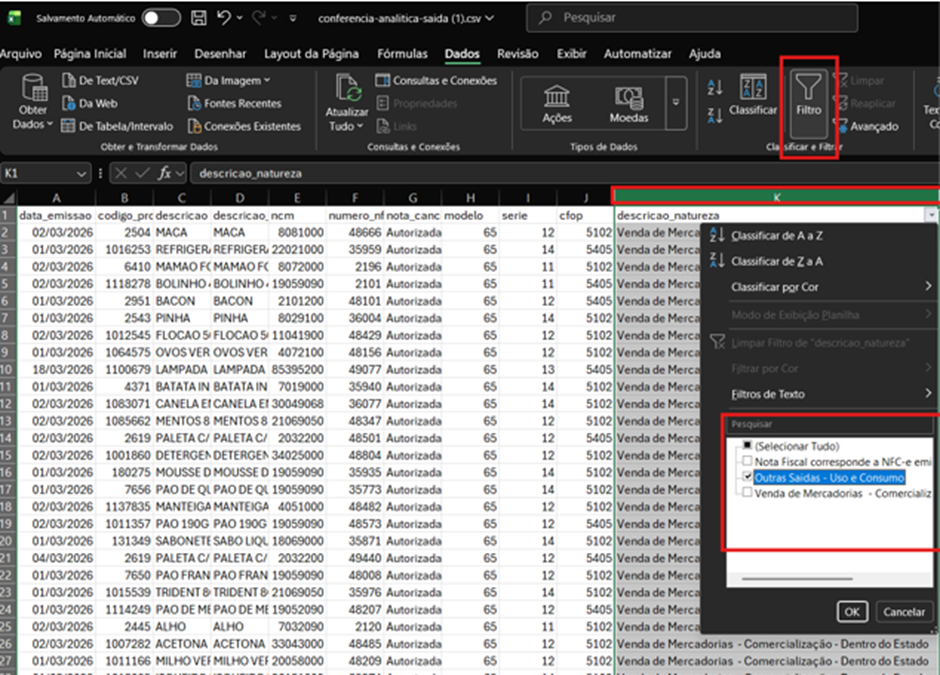
<span style="font-size: 12.0pt; line-height: 115%;">○</span><span style="font-size: 7.0pt; line-height: 115%; font-family: 'Times New Roman',serif; mso-fareast-font-family: 'Times New Roman';"><span style="mso-spacerun: yes;"> </span></span><span style="font-size: 12.0pt; line-height: 115%;">Selecione a **coluna K**.</span>

<span style="font-size: 12.0pt; line-height: 115%;">○</span><span style="font-size: 7.0pt; line-height: 115%; font-family: 'Times New Roman',serif; mso-fareast-font-family: 'Times New Roman';"><span style="mso-spacerun: yes;"> </span></span><span style="font-size: 12.0pt; line-height: 115%;">Clique em **Filtro**.</span>

<span style="font-size: 12.0pt; line-height: 115%;">○</span><span style="font-size: 7.0pt; line-height: 115%; font-family: 'Times New Roman',serif; mso-fareast-font-family: 'Times New Roman';"><span style="mso-spacerun: yes;"> </span></span><span style="font-size: 12.0pt; line-height: 115%;">Selecione apenas **"Outras Saídas - Uso e Consumo"**.</span>

[![image.png](https://bc.avancoinfo.com.br/uploads/images/gallery/2026-07/scaled-1680-/hkvimage.png)](https://bc.avancoinfo.com.br/uploads/images/gallery/2026-07/hkvimage.png)

<span style="font-size: 12.0pt; line-height: 115%; font-family: Lexend; mso-fareast-font-family: Lexend; mso-bidi-font-family: Lexend;">Dessa forma você conseguirá encontrar todas as saídas de Uso e Consumo no período pré-selecionado.</span><span style="font-size: 13.0pt; line-height: 115%; font-family: Lexend; mso-fareast-font-family: Lexend; mso-bidi-font-family: Lexend;"> </span>

<span style="font-size: 12.0pt; line-height: 115%; font-family: 'Lexend ExtraBold'; mso-fareast-font-family: 'Lexend ExtraBold'; mso-bidi-font-family: 'Lexend ExtraBold';"> </span>

<span style="font-size: 12.0pt; line-height: 115%; font-family: 'Lexend ExtraBold'; mso-fareast-font-family: 'Lexend ExtraBold'; mso-bidi-font-family: 'Lexend ExtraBold';"> </span>

<span style="font-size: 12.0pt; line-height: 115%; font-family: 'Lexend ExtraBold'; mso-fareast-font-family: 'Lexend ExtraBold'; mso-bidi-font-family: 'Lexend ExtraBold';"><span style="mso-spacerun: yes;"> </span>OBSERVAÇÕES IMPORTANTES</span>

<span style="font-size: 12.0pt; line-height: 200%; font-family: Lexend; mso-fareast-font-family: Lexend; mso-bidi-font-family: Lexend;"><span style="mso-list: Ignore;">●<span style="font: 7.0pt 'Times New Roman';"> </span></span></span><span style="font-size: 12.0pt; line-height: 200%; font-family: Lexend; mso-fareast-font-family: Lexend; mso-bidi-font-family: Lexend;">A saída deve ser realizada corretamente, informando os produtos, quantidades e motivo da retirada para manter o controle interno atualizado. </span>